• The site migration is complete! Hopefully everything transferred properly from the multiple decades old software we were using before. If you notice any issues please let me know, thanks! Also, I'm still working on things like chatbox, etc so hopefully those will be working in the next week or two.

Android = Aeroforce

Anyhow, different question. I am about to buy the full version. Does it have lock-up issues like the free one? I run the free one and it works great, but as soon as I go to exit, my phone locks up. I've never had that happen with any other app. Didn't used to do that a few months ago, but it has been lately. I've uninstalled and reinstalled with the same issue.

Just wondering...


It doesn't lock up. I only had problems trying to scan one of these:
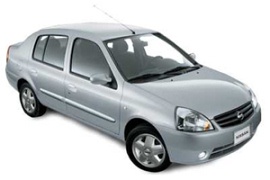
9k=
NISSAN_Platina-2006_main.jpg


But I also couldn't scan it with the PC applications or with the powrtuner. I think those may not be OBDII they are called Nissan platina here, but it's actually a Renault clio turned into a sedan with nissan badges. That time torque wouldn't say it wasn't supported or couldn't connect, it would just crash.

My ebay adaptor randomly stops transmitting and then it starts again btw.


Anyhow, different question. I am about to buy the full version. Does it have lock-up issues like the free one? I run the free one and it works great, but as soon as I go to exit, my phone locks up. I've never had that happen with any other app. Didn't used to do that a few months ago, but it has been lately. I've uninstalled and reinstalled with the same issue.

Just wondering...

If you have Pandora installed that's probably causing your lock up problem. Basically there's an issue with the Bluetooth drivers that causes a conflict between Torque and Pandora, so it's your phone not the app. If not, try deleting all the Torque files off your SD card, that should fix it.
 
So there is a conflict with Pandora, and people blame the phone (Droid Incredible is what I have which is one of the most purchased Droids out there) or Pandora (one of the most popular apps too). I don't have lock up issues when connecting to my car stereo for BT phone operations, or to my BT headset for when I am not in *my* car, or to my BT computer connector for transferring files. The only app on my phone that has ever locked it up is Torque, but I guess that can't be it. LOL :rolleyes:

I don't use Pandora or Torque enough to care I guess. I just noticed a lot more comments in the reviews of the free version about others having phone lock-ups but didn't see any in the paid version reviews. Again, I guess since I use the app so little, but want the additional features, I will just buy it and deal with any lock ups in the future.
 
Mine works for me but I would rather have a better one. The one I have will get my by until I can afford one of the more expensive ones.


just my 2 cent story, so far. I bought a cheapie adapter off ebay and it won't work. it'll read RPM and ect on the initial readings screen but anything other than that it nada. I've been updating Ian's program as I go along and his obd diags either report the device can't talk to the ecm or there are data errors. 've tried it on a 98 and 05 gtp.

I'm talking with the ebay vendor trying to get them to swap it out but so far all I've gotten are more tests and questions and whatnot on the device. It's been sort of a slow process because I've been busy but hopefully my last note to them will get a return going. I paid a very few more bucks for mine but got it from a vendor in Ca rather than china thinking I might have to return it. It looks like the ones from China but it shipped from Ca.

in the end I'll probably get the plx and be done with it.
 
I bought a plx and have had NO trouble with the connection. Did they get KR working? I haven't tried it since the last upgrade.


i got it working with my cheap adapter but how do i get kr to work?

From the Torque main menu, settings, Manage extra PIDs/Sensors, menu, Add Predefined set, then go back and add a KR display in the real time data. I Like to go into the KR PID and set the max value to 10*, default is 50*

I bought a plx and have had NO trouble with the connection. Did they get KR working? I haven't tried it since the last upgrade.

KR has been working great for a while
 
I loaded the pid's and kr still isn't working for me anyone else have this problem or am i doing something wrong?
 
This app is fantastic. I just got the PIDs loaded and haven't checked everything out like the KR yet but just having the information available that this shows is excellent.

I do have a question for people that are using this app. Boost..... Did you just use the stock boost or did you "adjust" it or anything. I'm just trying to determine if what I read is correct or if there needs to be an offset or something. I'm still new to my 02 GTP so I'm learning from the ground up. *EDIT* Got the boost thing figured out. Works like a CHAMP!


(FANTASTIC car by the way. I have a 2 door GTP that is apparently loaded. Had my mechanic do about $1300 worth of work to it and it runs like a DREAM. Performance mods next.....)
 
Last edited:


I didn't do anything except change the gauge type. The circular needle gauge seemed to give me odd readings but when I went to a digital numbers gauge, it seems right.
 
I loaded the pid's and kr still isn't working for me anyone else have this problem or am i doing something wrong?

Try sending a Comms Debug log to Ian, make sure to include your email address so he can get back to you.
 
Delete all gauges

Delete all PIDs

update torque

readd PIDs

readd gauges

----

that should fix majority of KR reading problems

some cheapie ebay ones work and others don't. mine works AWESOME in about half a dozen cars so far. It just won't seem to pull KR or knock count from my dad's 02 cadillac deville but whoopie doo...works fine on the park ane and other 3800's so that's all i care :)
 
Back
Top