• The site migration is complete! Hopefully everything transferred properly from the multiple decades old software we were using before. If you notice any issues please let me know, thanks! Also, I'm still working on things like chatbox, etc so hopefully those will be working in the next week or two.

DTC codes won't disable

scubasteve231

New member
Trying to disable the EVAP system on a 98 Grand Prix OS. The SES light keeps coming on and I keep getting codes P1665 and P1676. After the first time I got them, I set the fault type to "3: No reporting" and did a partial write. They came back. So the checked the bin, and they were still set to 3 and I did a full write. The SES light still comes on and these codes still keep getting stored.

One weird thing is that the DHP scan tool and UVSCAN will not read these codes. I try to read the codes from the computer with both these programs and I get "No codes found", but the SES light is on.

I borrowed a friends bluetooth OBDII scanner and used it with the Torque app on my phone, and it read these codes.

Doing an emissions monitor readiness scan shows that the EVAP system is READY, as if disabling the codes has worked.

Really stumped with this one. Has anyone seen something like these before?


theres two places to delete the codes, the one where you set it to no report, then the other where you change it to a zero iirc.

dhp will ask you if you want to save after closing each window, say yes.

if need be delete all the evap codes, theres about 12.
 
oh, and clear the codes before you re flash the pcm with the fixed code selections.

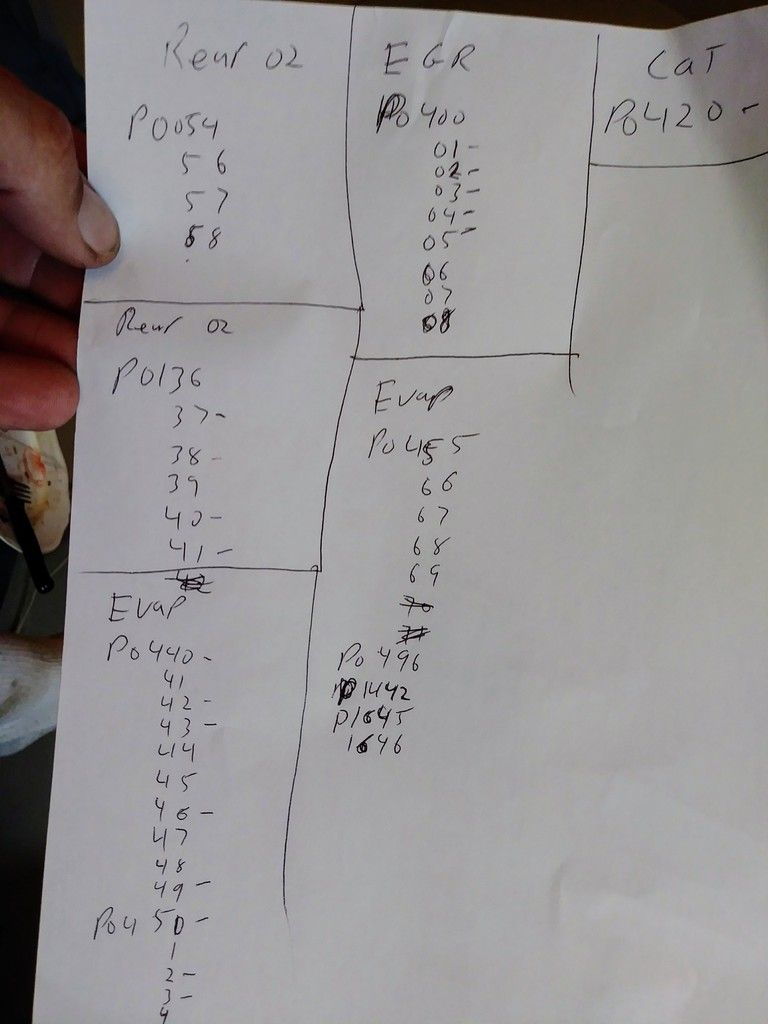
heres my code list i use, got tired of looking for them all in the dhp manual. not all the codes will be in your tune, just deleted the ones with in those ranges. see the dash next to some codes? those are ones that are there in this last tune i did, top left says rear o2, pretty sure thats the bank one sensor one codes. dont delete those. you need to know that o2 is working.

001_zpstd3sm9s8.jpg
 
in dhp theres two files, one you set to no report, the other file you make a 0. thats how many trips it takes to set the mil light. zero is no trips to set the light.


"DTC Fault Type" is set to "3: No Reporting" for both codes. Stock value was "2: Service on" for both.

"DTC Fault Enabled" is set to "0: Disabled" for both codes. Stock value was "0: Disabled' for both.

I've been turning off codes by setting them to 3: No Reporting and it has worked great for the Rear O2 sensor, EGR valve, and all the other EVAP codes for that matter. Am I doing something wrong?

One thing that may be unique about my setup is that the EVAP wires aren't connected to the PCM at all. Technically that shouldn't matter, but it could be why others with all the wiring/solenoids in place may not get these particular codes.

I found the service manual definition of these codes, and the computer is checking to see if there is 12V on the PCM pin that each code is monitoring. Basically to make sure the solenoid is present and that there are no opens or shorts in the circuit. I could trick the computer by sending 12V through a current limiting resistor to those pins.
 
stuff will only show ready asap if all evap codes are deleted right. your doing it wrong. all of em, not just the ones that pop up right away. i posted a list, delete all them codes listed under evap that are in your bin.

and set em to zero. not 3, 3 means it will set the mil light if it fails 3 diags.
 
Last edited:
stuff will only show ready asap if all evap codes are deleted right. your doing it wrong. all of em, not just the ones that pop up right away. i posted a list, delete all them codes listed under evap that are in your bin.

and set em to zero. not 3, 3 means it will set the mil light if it fails 3 diags.

Right now the EVAP readiness monitor is READY, yet I have a SES light and stored codes.

Before I uploaded the tune, I went through the DTC definition list and and changed those that I thought would cause a problem based on the description. I know you have to get all the codes for any given system you want to "disable" it properly.

It's funny, the two codes I'm getting from EVAP aren't even on your list.

DHP shows this as the numeric value definition for "DTC Fault Type" ....

0 = 1 trip SES ON, 3 trips SES OFF...this is exactly what the description says

1 = 2 trips SES ON, 3 trips SES OFF...this is exactly what the description says

2 = Service ON...From what I understand, this means a code will be stored but SES light will NOT illuminate.

3 = No Reporting...From what I understand, this is means that a code does not get stored or otherwise reported to any other part of the software, and the SES light will not illuminate.

You say to set to these codes to zero, but DHP tells me that a zero will get an instant SES light.

We must be talking about different things? I am really confused now.
 
i could be wrong. its been a while since i been deleting codes. maybe 3 for no report.

are the codes your setting listed in your bin file? what are the latest codes? and are they popping up fast? or it take time for them to show up.
 
The codes are P1665 and P1676. They are listed in the bin file. They show up a minute or so after a cold start.

I've successfully disabled tons of codes in this tune and even on other vehicles for that matter. If there is a problem with the way I am doing things then Im not sure how I've gotten this far.

I treated these two codes the same way...but for some reason they are like turds that won't flush.


i would try a new bin with a different osid #. or maybe even another pcm. you should have a spare handy if you dont, dhp can freak out and brick a pcm time to time.

theres bin files in the drop box in the tuning section, its a sticky.
 
ok just looked at a bin, the bottom file is a zero, the top file is a 3 or "no report" fault type is the top one, and a 3, fault enable is the bottom folder its a 0.

you need to delete the codes in both files in the diagnostic folder.
 
Last edited:
ok just looked at a bin, the bottom file is a zero, the top file is a 3 or "no report" fault type is the top one, and a 3, fault enable is the bottom folder its a 0.

you need to delete the codes in both files in the diagnostic folder.

That's exactly how mine is set.

I do have 2 extra 1998 PCM's I can try.

What is the newest OSID for a 1998 Grand Prix ? I'm using 16266449 as I had read that higher numbers were the newest. I think my other choice was 9352809.
 
Last edited:
in the drop box they are listed, the higher # should be a newest bin.

new bin needs a security learn, thats the key to on for 10 minutes 3 times bs. in the bin security folder, open it up, it says 600 seconds, make it 10, the other folder is how many times, it says 3, make it a one. after you flash the new bin, turn the key to run for 10 seconds, then off, then it will fire right up for ya. you just saved 30 minutes of your life.
 
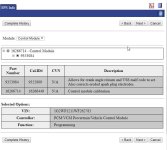
I found a random 1998 GTP VIN and checked the GM TIS website. Looks like 9352809 is the newest OSID that supersedes the one I am using. I should have checked this to begin with.

I guess the rule of higher numbers doesn't always apply. It looks like they sometimes change the number all together and start a new series of revisions or something.

I guess I will apply all my changes to 9352809 and see what happens. Probably better to be using the newer BIN file anyway.
 

Attachments

  • 2017-11-13 18_14_23-TIS.jpg
    2017-11-13 18_14_23-TIS.jpg
    68.6 KB · Views: 5


the osid of the bin is located in the bins info. open the bin, very top folder. all that cool info is right there.

as you know by now im sure, open both the new and old bins, just drag every folder to the new bin one by one that have changes made.
 
Do you know about the interchangeability of 1998 to 2002 PCM's and their respective programs? I've heard people say that these PCM's all share the same pinout and that nothing was really changed but of course each PCM has it's own part number and OSID's, but I don't know of any hard set rules of what you can and can't do.

For example, does a 1998 computer need a 1998 BIN to work right? Can the 1998 computer run a 2002 BIN file?

Would there be any benefit to running a 2002 computer and BIN? Is there a certain year of BIN file that DHP did the most work on, and is mapped out better than others?

The goal is to make sure that this time around, I'm using the most up to date and best mapped L67 computer and BIN file that I possibly can.
 
some pcm's cross over, i got a 01 pcm in my 98 regal. with a 98 bin of course. you need the year of your car bin for it to run right.

all you can do is try, if it takes it will just take, if its not gonna work you get a warning that is not comparable.

theres a pcm compatibility list in that drop box folder. shows the cross over part #'s.
 
Have you tried plugging in the evap components to see if it shuts the light off? I always left the evap stuff plugged in and just set everything to now reporting.
 
Back
Top