
You are using an out of date browser. It may not display this or other websites correctly.
You should upgrade or use an alternative browser.
You should upgrade or use an alternative browser.
TLSheff - Silver Sled
- Thread starter TLSheff
- Start date

Travisgt2
New member
So as I get to work this morning, I notice something strange, at least I think its strange. Factory wiring still for headlights, when I lock the doors with the remote, flashes both headlights and fogs together. Should only be the headlights, right? Not going crazy right?
Anyone with this problem or oddball behavior.
both of mine flash when its dark and just the fogs flash in the day

TLSheff
New member
both of mine flash when its dark and just the fogs flash in the day
Has been storming since yesterday so it's abnormally dark this morning. Could be part of it.

TLSheff
New member
Yeah 04+ get cooler options than our do :th_nanana:
Regardless, I figured it out!
F'n HIGHBEAMS!!! Somehow they got turned on (day before yesterday I guess) and I never noticed because I didn't go anywhere after dark in the car. Left a friends house last night and turned on the lights to realize the highbeams were on, thought that's wier---- WAIT A SECOND!!! FUUUUUUUUUUUU!!!!!
So I got home and checked, with high beams on lights/fogs flash, click them off and just the headlights flash.
I knew I wasn't crazy!!!
:th_peaceout:
Regardless, I figured it out!
F'n HIGHBEAMS!!! Somehow they got turned on (day before yesterday I guess) and I never noticed because I didn't go anywhere after dark in the car. Left a friends house last night and turned on the lights to realize the highbeams were on, thought that's wier---- WAIT A SECOND!!! FUUUUUUUUUUUU!!!!!
So I got home and checked, with high beams on lights/fogs flash, click them off and just the headlights flash.
I knew I wasn't crazy!!!
:th_peaceout:

Mad Monkey
The Mod Monkey
dont go as far as saying NOT crazy... just not AS crazy

Below Average Joe
New member
still slow :th_nanana:
TLSheff
New member
Got bored, ordered one of those little mini Elm327 do-hickeys (Technical Term). I figured for $5 for Torque Pro, then $12 shipped for the adapter, why not. If it works it works if not I will make them change them out under warranty until I am happy or they tell me to go F*** off and refund my money.
But the first one works.

Not connected because car is in garage turned off and I'm on the computer, but a couple test runs thinks I have 4-6* KR sporadically. Failure on my part or someones part of who I will not name names... logs were not saved. I will get the hang of this thing. Setting specific PIDs to log so I can go back and examine what is what during a couple WOT pulls. Hard to find a good safe spot to do them around there, feel like a stupid teenager again searching for a place to do stupid stuff without getting busted lol. Cops frown on my doing 90+ to see how KR is shown in 2nd gear in a 25-35mph zones, so we must be sneakies.
Stay tuned.
But the first one works.
Not connected because car is in garage turned off and I'm on the computer, but a couple test runs thinks I have 4-6* KR sporadically. Failure on my part or someones part of who I will not name names... logs were not saved. I will get the hang of this thing. Setting specific PIDs to log so I can go back and examine what is what during a couple WOT pulls. Hard to find a good safe spot to do them around there, feel like a stupid teenager again searching for a place to do stupid stuff without getting busted lol. Cops frown on my doing 90+ to see how KR is shown in 2nd gear in a 25-35mph zones, so we must be sneakies.
Stay tuned.

TexasTanker19kilo20
Gun nut and III percenter
WOT pulls in TX are normal, haha, small states.:th_jester:

Shiftingshaddow
New member
Got bored, ordered one of those little mini Elm327 do-hickeys (Technical Term). I figured for $5 for Torque Pro, then $12 shipped for the adapter, why not. If it works it works if not I will make them change them out under warranty until I am happy or they tell me to go F*** off and refund my money.
But the first one works.
Not connected because car is in garage turned off and I'm on the computer, but a couple test runs thinks I have 4-6* KR sporadically. Failure on my part or someones part of who I will not name names... logs were not saved. I will get the hang of this thing. Setting specific PIDs to log so I can go back and examine what is what during a couple WOT pulls. Hard to find a good safe spot to do them around there, feel like a stupid teenager again searching for a place to do stupid stuff without getting busted lol. Cops frown on my doing 90+ to see how KR is shown in 2nd gear in a 25-35mph zones, so we must be sneakies.
Stay tuned.
I cannot find those on torque pro. are they real time or "last recorded?" nice looking ride, btw. really like the wheels and black roof rails!
TLSheff
New member
I cannot find those on torque pro. are they real time or "last recorded?" nice looking ride, btw. really like the wheels and black roof rails!
Thank you, she doesn't have alot done but I keep her clean and enjoy a nice daily driver.
Listing from top then right to left going down
Engine Load %
Timing Advance
Knock Retard
Intake Air Temp
Engine Coolant Temp
AFR (Air Fuel Ratio) Commanded - My Torque App shows 2 for commanded, not sure which one, just played until I got one that worked.
Turbo Boost & Vacuum
Chose all small gauges, medium was too big to put side by side and large is redonkulous.
All in the Real time data section, I went to setting and dropped it down to 1 page, I can always plug and minus the gauges to fit my needs, 7 pages all at once is too much. Lags it down, I like fast responses. To add them or get the list of all options, either push and hold on the screen or hit menu and item option "Add Display" then choose which you want to monitor. This is after you setup the PIDs for GM/Pontiac and setup a vehicle profile.
Didn't get around to playing with the car last night after the post, GFs bestie required muscle to move some stuff and I was nominated the best suited at the time, so I didn't get to play. But after work today, the motor will be screaming lol
TexasTanker19kilo20
Gun nut and III percenter
Take a screen shot at WOT, kinda tricky LOL.
Below Average Joe
New member
after all of this hassle, you will still find that your car is slow...........JKJK it looks good chef :th_nanana:
Shiftingshaddow
New member
Thank you, she doesn't have alot done but I keep her clean and enjoy a nice daily driver.
Listing from top then right to left going down
Engine Load %
Timing Advance
Knock Retard
Intake Air Temp
Engine Coolant Temp
AFR (Air Fuel Ratio) Commanded - My Torque App shows 2 for commanded, not sure which one, just played until I got one that worked.
Turbo Boost & Vacuum
Chose all small gauges, medium was too big to put side by side and large is redonkulous.
All in the Real time data section, I went to setting and dropped it down to 1 page, I can always plug and minus the gauges to fit my needs, 7 pages all at once is too much. Lags it down, I like fast responses. To add them or get the list of all options, either push and hold on the screen or hit menu and item option "Add Display" then choose which you want to monitor. This is after you setup the PIDs for GM/Pontiac and setup a vehicle profile.
Didn't get around to playing with the car last night after the post, GFs bestie required muscle to move some stuff and I was nominated the best suited at the time, so I didn't get to play. But after work today, the motor will be screaming lol
i don't know what it is, but I cannot find a knock retard monitor anywhere in my menus. I have the added plug in but I want to be able to monitor it all the time instead of just full throttle and be able to see the actual numbers. I have all the others but that. edit: nevermind. I remembered you put a how to up and checked it there. Thanks!
Last edited:
TexasTanker19kilo20
Gun nut and III percenter
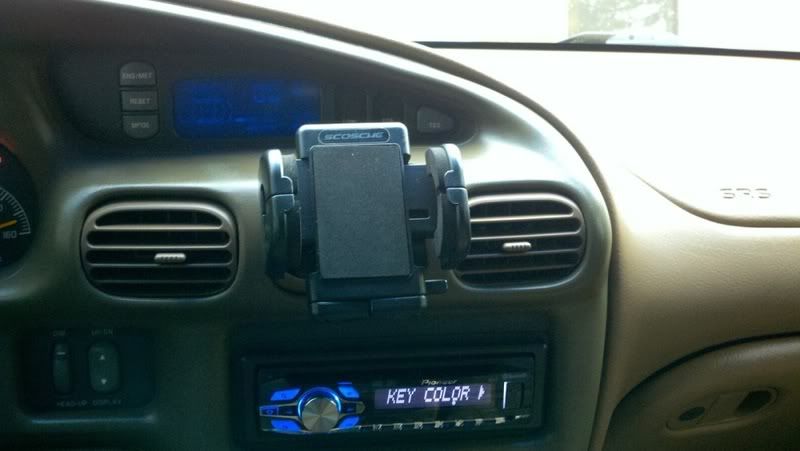
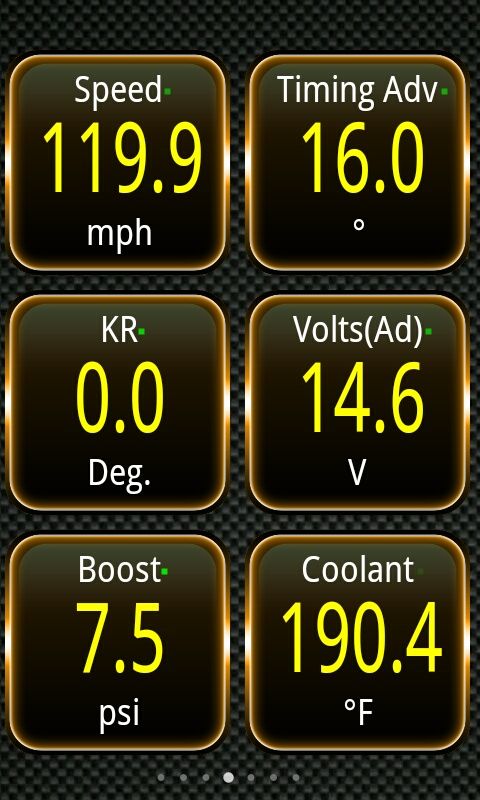
Sorry for late reply, but yes, with the app open, touch real time information, then touch menu button on phone, on the pop up touch MORE, then touch SHARE SCREENSHOT and email it to yourself or facebook or whatever. To take a screenshot at WOT (my method) have the screenshot button ready to touch. at the height of the WOT pull touch the share screenshot button, don't worry about emailing it til after you have slowed down to a stop. I have a phone holder that sits in my vents to aid me.
My phone holder
WOT pull screenshot
My phone holder

WOT pull screenshot

TLSheff
New member
Nice, yea I definitely need a holder like that. Had the GF holding it while I did a couple WOT pulls, she was screaming out numbers like a auctioneer so I didn't have to try to watch it.
My video (that I can't get to export) was similar except I stopped about 90ish, timing was in the lower 15s, boost was just hitting 7psi, and there was 3*ish of KR. Still on stock pulley with headers and a DHP1.0, I think its in the box tune and maybe from a leak in the header, figured I'd get a 3.5 pulley and have it actually tuned for more timing and go from there.
My video (that I can't get to export) was similar except I stopped about 90ish, timing was in the lower 15s, boost was just hitting 7psi, and there was 3*ish of KR. Still on stock pulley with headers and a DHP1.0, I think its in the box tune and maybe from a leak in the header, figured I'd get a 3.5 pulley and have it actually tuned for more timing and go from there.