• The site migration is complete! Hopefully everything transferred properly from the multiple decades old software we were using before. If you notice any issues please let me know, thanks! Also, I'm still working on things like chatbox, etc so hopefully those will be working in the next week or two.

Installing Factory Navigation 2008 Grand Prix GXP

Cheezehead

New member
I just purchased a 2008 Grand Prix GXP and it has every option except engine block heater (don't care) and navigation. I ordered a factory ACDelco GPS/Navigation antenna and I will install it tomorrow in the factory location. I know I need to have the nav unit unlocked but I have a couple of questions.

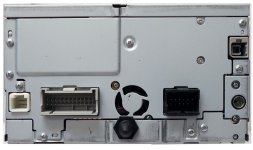
Can anyone tell me (without guessing) what the 4th electrical plug is on the back of the nav unit (not counting the radio antenna port)? Port 1 and 2 are the factory radio plugins, port 3 is for the nav antenna and port 4 is for??

Once I install the nav unit and plug in the (3) know plugs will I need to install anything else to make the nav work as intended from the factory?

Thanks for your help.
 

Attachments
  • 4__24254_1357945110_1280_1280.jpg
    4__24254_1357945110_1280_1280.jpg
    94.3 KB · Views: 64
Last edited:


I received the GPS antenna (ACDelco 15821030) and located where the antenna would have been installed from the factory and the pig tail coming from the antenna is 12" which is way too short for a direct connection to the nav unit (36"). I assume the pig tail plugs into the harness somewhere near the mounting location but I don't see a plug nor do I see a plug coming out of the harness near the nav mounting location. Can someone tell me if I'm on the right track or if a factory nav unit install in a non-factory nav installed Grand Prix is just too hard?
 
The smallest plug is for the microphone. I have one if you need it. Any two wire microphone can be wired in for audio input. Otherwise voice commands won't work.

Sent from my SPH-L710 using Tapatalk 2
 
The smallest one (not counting the radio antenna plug) is for the GPS antenna (upper right hand corner). The plug in question is the white plug lower left hand corner of the picture. I want to wire the nav unit stock/factory, I don't want to cut and splice wires. Thanks
 
The far left plug. I didn't mean the satellite plug. I have a factory white plug with the wires coming out of it to be wired into any type of microphone because you can't get a stock microphone for our car. I've already upgraded many 04+ to nav.

Sent from my SPH-L710 using Tapatalk 2
 
My 08 GXP has OnStar so it has a mic, I should be able to plug into the harness somewhere and piggy back on the existing mic like the factory did.


Yeah my bad I forget 05+ have mirror mics. I can get you pin outs of that plug to piggy back off of for the nav but like I said it's for voice command.

Sent from my SPH-L710 using Tapatalk 2
 
Should there be a plug somewhere in the harness to go from the nav to that plug? I wish there was a better picture of the wire bundles and where the plugs terminate.
 
I realize that this was a while ago, but did you experience the same issue as I did? Namely:


I have the same car, but I have a 2008 Pontiac Grand Prix GXP which was delivered without the Nav. Previously I had a 2007 Pontiac Grand Prix with the factory navigation radio. I installed the navigation radio into my 2008 Pontiac Grand Prix GXP. Once the Chevy dealer changed the VIN on the radio and unlocked the radio, the factory Navigation started working (soft of) in my 2008 Pontiac Grand Prix GXP. With a GPS antenna installed, the system sees the satellite. The maps work and the car is positioned properly on the map. The map moves correctly and the car maintains the correct position. The destination can be input and the route is calculated and displays. But turn by turn navigation never starts. The option to calibrate the position and direction also work fine. The option to “Calibrate after a Tire Change” button does not function. The owner’s manual implies that there is communication between the TPMS or speed sensors and the navigation system. The manual also implies that certain functions are dependent upon the TPMS and speed sensors in order to be available. Apparently I need a software update. Could you provide me your VIN from your 2008 Pontiac Grand Prix GXP so that my dealership has something to search upon? With that VIN, we might be able to get the correct configuration or firmware update.
Thanks so much.
Regards,
John L.
 
attachment.php
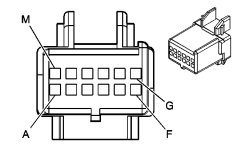
Could someone download this picture of the wiring harness and place a red dot on the appropriate pin for the VSS wire? I am struggling here to determine the correct pin location on the 12 pin radio harness.
 

Attachments

  • Pontiac Radio Pin Out.jpg
    Pontiac Radio Pin Out.jpg
    52.2 KB · Views: 77


I am just about to start putting a NAV into my 06 GXP the guy said that the antenna I have with the car as there is OnStar on it will work.. not sure but I guess I will know what I am getting into tomorrow . Do you have a pic of that mic and plug you have . Thats if you still have it? Tks
 
I am just about to start putting a NAV into my 06 GXP the guy said that the antenna I have with the car as there is OnStar on it will work.. not sure but I guess I will know what I am getting into tomorrow . Do you have a pic of that mic and plug you have . Thats if you still have it? Tks
I ordered a used Nav unit from ebay. My car has the factory 6 disc changer and onstar/ XM radio. Is this the same antenna that the nav unit uses? Do I need anything else besides vin programming to make it work?
 
I don't know the answer to your question, but I didn't realize these cars came from the factory with XM radio. do you still use yours?
 
I don't know the answer to your question, but I didn't realize these cars came from the factory with XM radio. do you still use yours?
I got three months free when i bought the car used from a Toyota dealer. I get deals in the mail from them all the time.


I ordered a used Nav unit from ebay. My car has the factory 6 disc changer and onstar/ XM radio. Is this the same antenna that the nav unit uses? Do I need anything else besides vin programming to make it work?

Hi Where are you? I am in Kamloops BC.. I still have not insttalled mine permanently , I tried it and of course it showed the arrow and said it was locked. so put my old 6 disc one back. I found out with pictures of the harness that it does need an antenna so ordered one with the right plug. I heard you have to put a wire to the vehicle speed sensor and been looking on how to do that part of it . soon I am going to pull the dash apart again to see if there are any hidden plugs hanging around to fit it.. Also someone said that certain code readers will program these.. $100.00 to get gm to do it..
 

Attachments

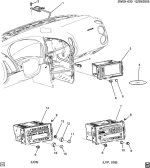
  • 0512292W09-030.jpg
    0512292W09-030.jpg
    97.1 KB · Views: 12
Hey there. I am in Wisconsin USA. I am still waiting on my radio, should come today. I ordered a Kenwood antenna from Amazon and a nav disc from ebay. I looked on alldata and it showed that one plug had the vss speed sensor wire already in it. Dark green I believe. I am going to plug it all in and see what happens. they may have included the vss wire in 2008 models. Will have to wait to try it.
 
I have an Autel Maxidas that has the option to program the radio. If it doesn't work I am going to get a chinese clone Tech2 off of ebay to do it.
 
Back
Top