• The site migration is complete! Hopefully everything transferred properly from the multiple decades old software we were using before. If you notice any issues please let me know, thanks! Also, I'm still working on things like chatbox, etc so hopefully those will be working in the next week or two.

bluetooth obd 2 adapter and torquepro ( obd 2 & car ) questions

OP, I have the exact same model of adapter.

It worked great for me, and I don't even have a smart phone! Use it with any android OS (even on PC). If you're just looking to monitor things like LTFTs or KR, it works great. Only reason I don't use my setup anymore is because I bought HP Tuners to make changes.


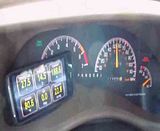
Here is what I monitor with my Torque App, it has worked great so far. The Elm BT adapter was $15 and the app $5. Well worth it IMO.


Here it is in action.
 
Your CEL is on! I also am using the HTC inspire 4g to use Torque. I monitor boost, gear number, trans temp, KR, throttle position and 1-2, 2-3, 3-4 shift times.
 
I have torque bluetooth, A scanguage, A gensys scantool, Scan xl, and HPtuners. In order from slowest kr update rate (or general scan rate) to fastest update I would say

5. Scanguage
4. Torque Bluetooth
3. Gensys
2. Scan xl
1. Hptuners

Hptuners I swear you can scan infinant pids without lagging it. Torque pro however tops out at 3 or 4 if you want good speeds.


yeah I've got the rear o2 no signal, Maf low voltage, and a pending lean bank 1. I'll have to do some cleaning soon as it stops raining


OK so I got everything up and running. Just wondering if there is a plugin/pic that shows actual real time kr. The app I saw only seems to slow you to view the number of times you knock. That app was ' knock detector' by developer ' nosoftskills. '. I thought I saw an app that actually shows as a pid and you can just view real time.

Also how do I view boost in psi? I looked through the menu and set all the units of measure but all I seem to see is vacuum in hg
 
... Just wondering if there is a plugin/pic that shows actual real time kr. The app I saw only seems to slow you to view the number of times you knock. That app was ' knock detector' by developer ' nosoftskills. '. I thought I saw an app that actually shows as a pid and you can just view real time.

Also how do I view boost in psi? I looked through the menu and set all the units of measure but all I seem to see is vacuum in hg

:th_doh: Okay... Knock Detector is a solid app/plugin within Torque that just tells you how many times you knocked over a certain time frame/distance.

What you are after is within Realtime Information you need to pick one of the 7 pages and push/hold on the screen and "add display" or push menu and "add display", select "Digital Display"(one with a - in the picture), then scroll WAY down to "K"s and click Knock Retard and small box and put it where you want. Now as long as you have the GM PIDs loaded as you drive it should show if you knock as it happens and to what degree * it does knock.

To display boost as PSI you need to go to the main Torque Screen, hit menu, settings, go to Units, then halfway down make sure to UNCHECK the "Don't display psi as in/Hg". You can also make a couple other adjustments here as you see fit.
 
Thanks. I got the boost worked out. But even after I downloaded knock detector there is still no pid for kr in the add display menu
 
K, try this.

Go to the main Torque Page on the phone, Menu, Settings, (scroll to bottom) Manage extra PIDs/Sensors. This SHOULD go to a new page with all sorts of ECU Custom PID files. If not and its just a Carbon Fiber looking background or just a couple that you have added, do this.
Menu -> Clear List -> Menu (if it goes back to the screen) -> Add predefined set (should be the middle choice in the options). Now click Pontiac/GM/Opel/Vauxhall and it should pull up A BUNCH of PIDs, scroll through, there should be a Knock Retard and a Knock Retard (alt) if not come back, if so, go for a drive after you add the display in Realtime Data section. Enjoy.


That's basically the setup I want. With the kr pid in there

What knock add on is that

No add on, after loading the GM Pids, it was located in the menu on real time gauges.

K, try this.

Go to the main Torque Page on the phone, Menu, Settings, (scroll to bottom) Manage extra PIDs/Sensors. This SHOULD go to a new page with all sorts of ECU Custom PID files. If not and its just a Carbon Fiber looking background or just a couple that you have added, do this.
Menu -> Clear List -> Menu (if it goes back to the screen) -> Add predefined set (should be the middle choice in the options). Now click Pontiac/GM/Opel/Vauxhall and it should pull up A BUNCH of PIDs, scroll through, there should be a Knock Retard and a Knock Retard (alt) if not come back, if so, go for a drive after you add the display in Realtime Data section. Enjoy.

Looks like the Sheff has learned the app real well. Did you get a screenshot yet?
 
OK I'll look more into it when I'm off work. It went to the carbon background and there was nothing there. I got a prompt to not go any further as it could affect some things in the ecu. ?? I'll try later to get a little more into it.
 
Not yet lol. Haven't taken the time to go for a drive, but soon.

But yes, been playing alot with the app, feel like a pro with it almost, got it all kinds of tweaked... if only it would export my videos!?!?!?!?! :th_shakinghead2:
 
OK I'll look more into it when I'm off work. It went to the carbon background and there was nothing there. I got a prompt to not go any further as it could affect some things in the ecu. ?? I'll try later to get a little more into it.

Odd... hrmmmm.

I never noticed a pop-up like that, but I also loaded all the PIDs and got it setup prior to every plugging it into the car. Just played with the app on the phone at work during downtime, researched things during downtime, and so by the time I got off work, I was Boss status with it, now I'm like Pro status with it...
 
Back
Top