• The site migration is complete! Hopefully everything transferred properly from the multiple decades old software we were using before. If you notice any issues please let me know, thanks! Also, I'm still working on things like chatbox, etc so hopefully those will be working in the next week or two.

Who's an internet setup guru?

ZR1Vette09

Resident HOMOsapien
Just wondering if anyone else has similar issues. When I use my laptop wirelessly, I often (about ever 5 or so refreshes) lose internet connection. It says I'm connected to the network but with no internet access. Only happens at home, which is where i use my computer 90% of the time. We have other computers on the home wireless and they never have issues. I have no idea what is going on.


What's your setup? Like Cable> Modem>Wireless Router

Most times a firmware update for the router will fix a lot of issues. Pretty simple to do as well.
 
Currently says there are no issues. That's because it's very hit and miss, it'll work fine for 30 minutes, then act up for the rest of the time i'm on. We have cable coming to our modem, connected to the router. Trust me, that is the very extent of my knowledge and the only reason I know that is because I jack around with my xbox alot, plugging it in, attempting to run it wirelessly (which also blows, it fails to find me any matches when I'm wirelessly connected on CoD.)
 
Wireless has its issues. I prefer wired. Brian had this issue because his Wii would take the IP of the Laptop and kick him off. We statically set his IP on his laptop to a high number and never had any issues after that. The problem you run into when you do that is if you take it outside of your network if your not in the wireless IP range or your address you set statically is in use there will be a IP conflict. I would try updating the router firmware like said before. If all else fails go DDWRT on it and flash it to an open source firmware that works.
 
You could try a "hard reset" by unplugging the modem and router for 5-10 minutes and plugging them back in.

If its an old or inexpensive model of wireless router, it may be time for an upgrade.

If you have several other wireless devices on the same wireless network, the other devices may have a stronger wifi pull on the router causing your laptop to get a smaller signal.


It's a fairly new router. All that firmware talk is over my head, don't even know what that is. It could be that we have many devices on the wireless network but my laptop is the only one with issues. Basically I've been messing with skype the last couple days making sure everything works so I can talk to my dad overseas but every video call I have made has been dropped at some point.

BTW, we have 3 iphones, a wii, and 2 laptops connected wirelessly as well as a desktop and xbox hardwired in.
 
For the video calls, you may want to plug into the modem or router directly for the best quality.

Is your laptop older? If so the wireless network car may be weak.

Xbox will steal most of the connection if you're online at the same time as somone is playing a multiplayer game.
 
Nah you can have alot of stuff on your network. Your router hands out addresses to each of them. Firmware is essentially the Operating system for the device. Like your PC has windows your router has "Firmware" that makes it do what it does. Do you have your routers wireless named something besides the default "Linksys" SSID or whatever router you have. Cause if your running it on default settings with no security or passwords enabled that could be an issue too.
 
It's named and password protected. My laptop is just over 2 years old, it's an Asus X83V that I'm running Windows 7 on. On startup it gives me a multiboot option with Vista that it came with, just can't figure out how to get rid of that.
 
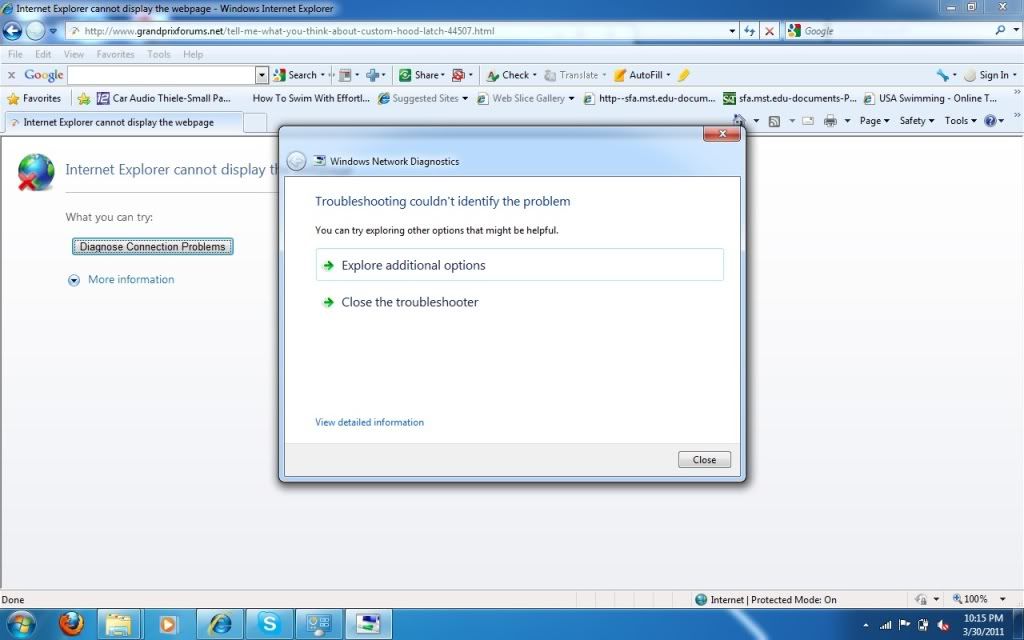
Also has some minor more common issues. For example, even as I'm reading this page no one's avatar loads, I get just red X's. Part of the reason why I haven't been able to troubleshoot it when it happens is I hit "Diagnose Connection Problems" and it'll think for a long time then say nothing is wrong and magically the internet is back.


Bam, got her to do it again just now. I'm running firefox now so i could leave this window open:

InternetCrap.jpg


Also when I opened firefox, there was a loading circle over the bars and it said "Identifying (network name) -No internet Access"
 
you can try "Click on orb in the search bar type cmd hit enter type "ipconfig" no quotes and see if the router gave you a ip should start with 192.168.?.???" just to makes sure that you are connected then you can type cmd "ipconfig /release" then "ipconfig /renew" see if that does the trick, once again without the quotes
 
How many other networks do you go on that laptop besides your home network? What program do you use to connect wireless, is it windows 7 default connecting, or is it some other 3rd party software handling the wireless connections?

What brand/model of router do you have? Post it up and we can walk you through updating the firmware.
 
STLMO: What is the orb you're talking about?

fosho: I use whatever network I need at school, friends' houses, that's about it. This is the only one I've connected to at my house. didn't know there were other ways to connect to the internet, I just clicked on my router and typed in the password and it remembers it everytime I'm home. Router is a Netgear WNR 2000. Even now, as I'm browsing pages, I still have the loady circle and it says no internet access. If this edits correctly, then apparently I actually do have internet.


Back
Top