
You are using an out of date browser. It may not display this or other websites correctly.
You should upgrade or use an alternative browser.
You should upgrade or use an alternative browser.
want to upload "bigger" pics
- Thread starter Ryan99639
- Start date


Depending on your photo software you can edit,tools,adjust the size of your file by manipulating the pixels. Todays camera's shoot ridiculously high res shots that quite frankly are useless for the masses. If you play around with it and watch the size, you can get them down usually with little fuss.
Though you also get the benefit of having your photos backed up on another server...unless you have a mac...then you dont need to worry:th_winking:
Though you also get the benefit of having your photos backed up on another server...unless you have a mac...then you dont need to worry:th_winking:

Scottydoggs
Killa Bee
click the ico to insert pics, top 3 rd from the right.
then click the url tab, then un check the box, then paste your url in the line, hit ok.
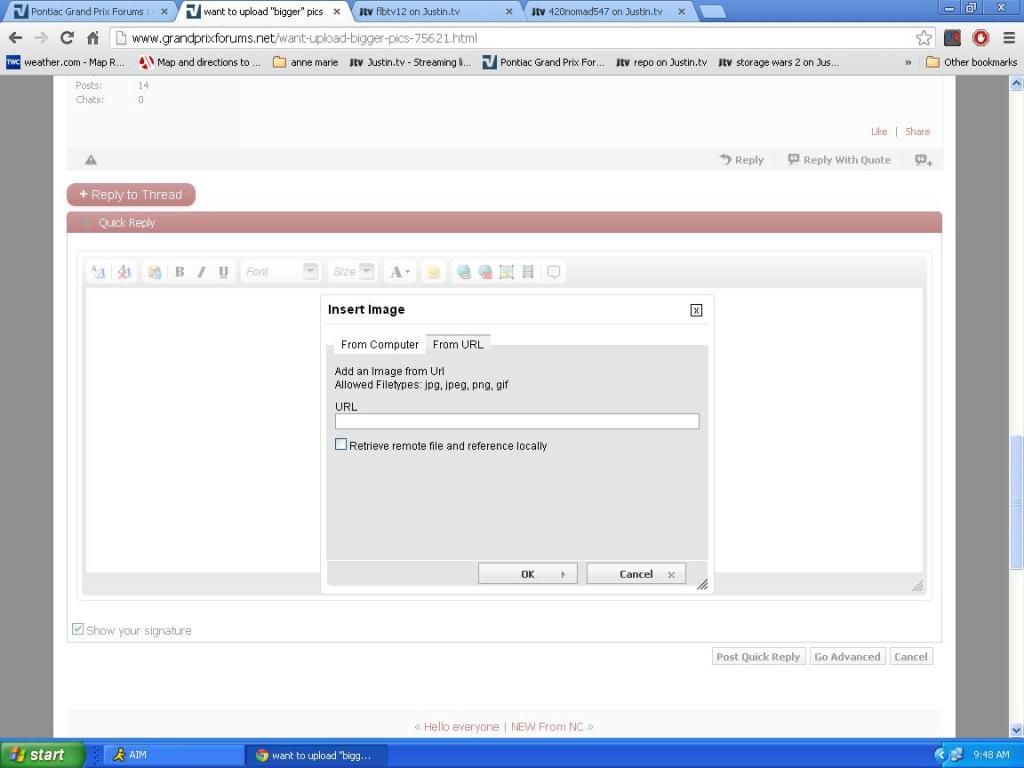
then click the url tab, then un check the box, then paste your url in the line, hit ok.

TLSheff
New member
Go to Photo and image hosting, free photo galleries, photo editing and make an account (no worries its completely free)
upload HD photos, it will automatically reduce size around a 1280x1024 size depending.
Click on the photo, on the right there is a "Direct copy" url, copy that, come back to this site, click "Insert Image" button on toolbar above and paste "Direct copy" url from photobucket.
simple.
upload HD photos, it will automatically reduce size around a 1280x1024 size depending.
Click on the photo, on the right there is a "Direct copy" url, copy that, come back to this site, click "Insert Image" button on toolbar above and paste "Direct copy" url from photobucket.
simple.
Frankscars
New member
How do you get a url from your photo that are on your computer's hard drive?
