
You are using an out of date browser. It may not display this or other websites correctly.
You should upgrade or use an alternative browser.
You should upgrade or use an alternative browser.
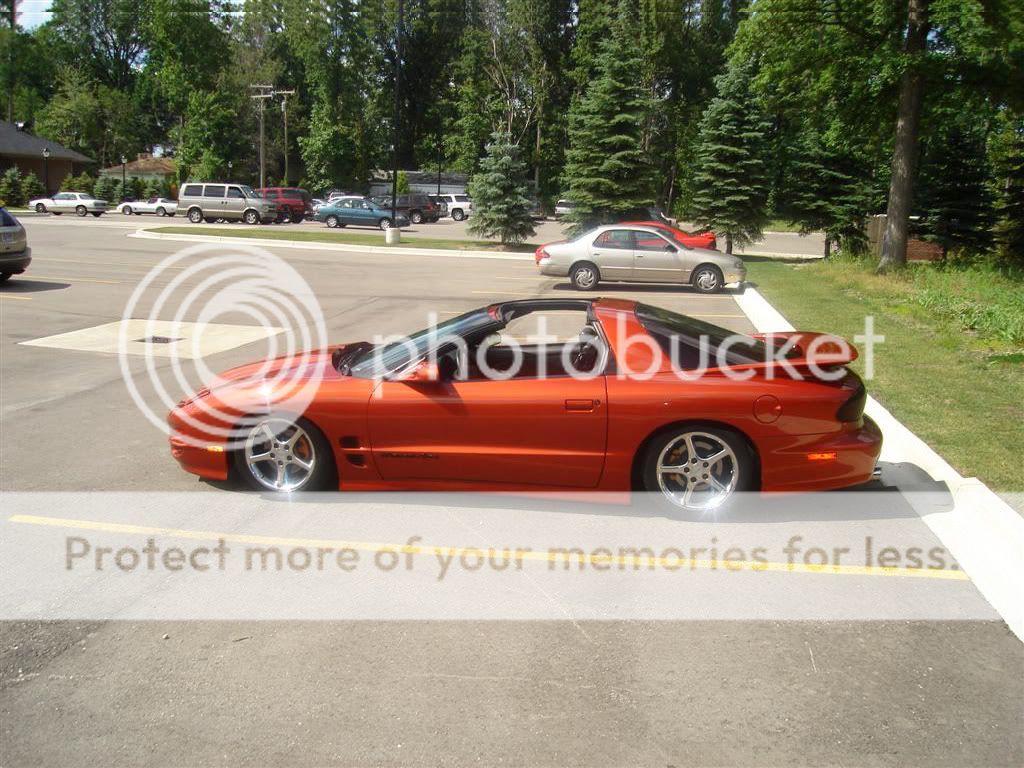
So I got bored...
- Thread starter PurpleGuy
- Start date


rocafella2032
New member
You forgot the shadow. Otherwise looks good, love that car

PurpleGuy
New member
I know...i just didn't go right next to the quarter panel...i just went in the wheel well and didn't get to detailed with it lol. I just realized you were talking about the back of the car...i thought you were talking about the wheel well. I didn't go super detailed....Ill make another one with more detail.You forgot the shadow. Otherwise looks good, love that car
Last edited:

PurpleGuy
New member
Look at the top too :th_mischievious: Like I said i didn't go too detailed...it was pretty much my first photoshop.L>ooks like you chopped the curb behind the car, other than that looks good

ZR1Vette09
Resident HOMOsapien
Meh, not liking it. I still see that as a real muscle car, shouldn't be lowered.


Bio248
DUI BABY
Meh, not liking it. I still see that as a real muscle car, shouldn't be lowered.
yeah, youre right, lower centers of gravity dont help with handling at all.

blueguy
The Blue One
Meh, not liking it. I still see that as a real muscle car, shouldn't be lowered.
Your truck is ugly and COD is for da gheyz...why do you never like anything that isn't yours?

Spartan GL
Specialist Walter US Army
looks good i like the color!

nawarkk
GPF Mr. President
To lower it you have to select the under of the car. So select anything along the bottom of the car, minus the rims. Start from one side of the picture and go all the way to the opposite. In the process of selecting you have too intersect the car and pick everything but the wheels.
You're basically gonna copy paste whatever you selected to a new layer. The move that whole layer down. This will lower the top half of the picture and the body. But it will keep the rims and wheels in the same position since they are on a different layer. You have to go back and fix the environment a bit since most likely they wont line up. Use the spot healing tool or the stamp tool. Hope this helps
You're basically gonna copy paste whatever you selected to a new layer. The move that whole layer down. This will lower the top half of the picture and the body. But it will keep the rims and wheels in the same position since they are on a different layer. You have to go back and fix the environment a bit since most likely they wont line up. Use the spot healing tool or the stamp tool. Hope this helps
Last edited:
nawarkk
GPF Mr. President
Healing tool is basically you just highlight something with the brush it gives you and it will fill it in automatically to make it look like nothing ever happened. Doesn't work 100% of the time perfectly but it's good to mess with.
Stamp tool you have to hold alt and select a source on the picture. After that, it will sample from that area, and when you use the brush it gives you it will fill in from that area. Try them out
Stamp tool you have to hold alt and select a source on the picture. After that, it will sample from that area, and when you use the brush it gives you it will fill in from that area. Try them out
ZR1Vette09
Resident HOMOsapien
yeah, youre right, lower centers of gravity dont help with handling at all.
It's a Trans Am, it wasn't built for handling. When I picture a built trans am, I think of this:

No need for the assholeish sarcasm, I'm a lot smarter than a lot of guys on here.

SilvaMan61
GPFs Sexy Ginger.
^ stfu that car is sex at any ride height

KwazrollinZ28GTP
New member
It's a Trans Am, it wasn't built for handling. When I picture a built trans am, I think of this:.
No need for the assholeish sarcasm, I'm a lot smarter than a lot of guys on here.
eeew fireroachs are ugly without wings.