• The site migration is complete! Hopefully everything transferred properly from the multiple decades old software we were using before. If you notice any issues please let me know, thanks! Also, I'm still working on things like chatbox, etc so hopefully those will be working in the next week or two.

DIC COLOR CHANGE!!! First atempt, learn from my mistakes

Kejross

New member
okay so i saw this mod in another post and after asking around and not getting much if any response i decided to just tear into it and see what happened. and why not? i got nothing but time = outta work for 4-6 months from a bike wreck and massive shoulder surgery

so first off take out and completely apart til it looks like this:
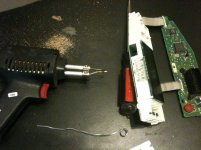
IMG_0450.jpg


then cut all these pins like this to flip the lcd open:
(i didnt wanna desolder all those but its an option)
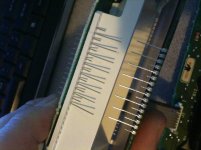
IMG_0438.jpg


then remove the backing of the lcd with a razor like this:
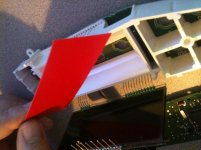
IMG_0441.jpg

then i used carb cleaner but paint thinner would be better to remove the red coloring from the piece


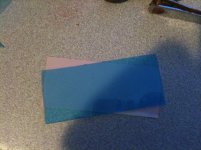
next step i took a generic dvd case that was blue and cut a piece to put behind it like this:
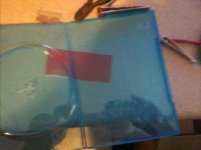
IMG_0443.jpg
IMG_0445.jpg


then just stuck them behind the lcd and resoldered the pins on the side really sloppily like this:
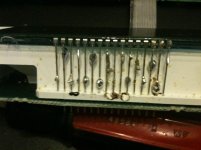
IMG_0449.jpg


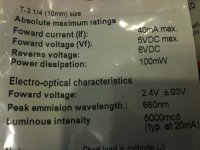
then i went and bought my leds from two different radio shacks cause they didnt have enough at one store. i got 10mm blue leds for behind lcd and red leds for behind the buttons and some 560ohm 1/2 watt resistors like these:
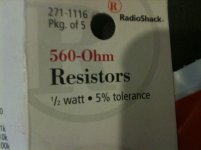
IMG_0459.jpg
IMG_0460.jpg

then drilled out the openings a bit with a 3/8"s bit and tucked them in like this:
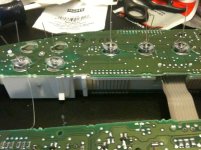
IMG_0455.jpg


now when putting them in the polarity matters so i had to go plug it in and check and this is what i found out:
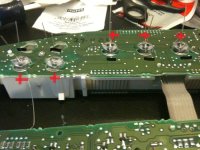
IMG_0455edit.jpg

keep in mind the longer of the two leads is the positive side...

continued:
 
Last edited:
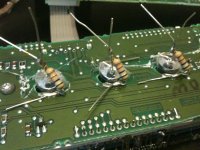

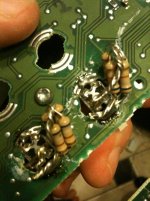
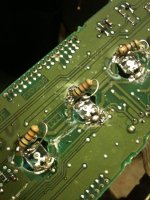
then i soldered everything in with the resistors on either side but always in series or inline with the led not across it and heres how they looked:
IMG_0466.jpg

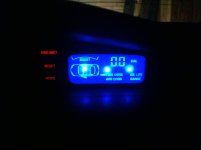
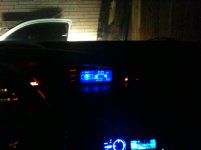
now i had contemplated putting the leds in the plastic bulb case but it looked a little dificult so i went straight to the board, up to you how creative you wanna get. i have plugged it in and confirmed it works but im gonna wait til dark to post pics of the final product... i can tell already there are three super bright dots on the display from the focused beam of the led, the only thing i woulda done different is probably cut the tip of the led off to keep it from fucusing a beam. maybe use a grinder to leave it kinda foggy too so the beam is even more dispersed. get ahold of me if you have any questions or comments on how to improve the idea...

and if you really wanna get fancy and change the button color just swap these little leds out and scrape the red from behind the buttons:

http://www.grandprixforums.net/attachment.php?attachmentid=2213&stc=1&d=1280439110
 
Last edited:
thinking those dots might get annoying... i may end up taking it back apart and fixing that, but still better than a half burnt out redish orange. im thinking if i dipped the tips in black paint a couple times it would shine out the sides and be pretty even.

IMG_0476.jpg
IMG_0479.jpg


thanks everyone, and just so ya know girlygt i did see plenty of pink leds at the shack if your gonna do it... you really dont have to put the colored plastic behind the lcd either i just wanted to make sure it was good and blue and not baby blue or something
 
it's about time somebody did a write up on this. hopefully you can get rid of the dots soon and let us know how. thanks for your time and effort
 
looks great! what if you were to sand down the head of the LED so it doesn't have a direct beam? I've seen people do that before. So instead of the LED being domed it would be flat???


yeah i mentioned sticking them to the grinder up in there, i found another type of led thats not directional at all im gonna buy another dic and try it out on that one since i need one anyways to convert my gt over to the digital dic anyway

heres the link to it with part number on the shacks site, i just dont like that its a 4 pin design... just means more soldering...

4-Pin High Brightness Blue Power LED - RadioShack.com
 
wouldn't it be best to use a circular cut out of aluminum tape on the led, so that it reflects the light and not absorbs it?
 
i just bought those 4 pin leds in the link above and am gonna pull it out and redo mine tomorrow time permitting and ill post pictures and all that after im done... i looked at the back of the package on the others and they have a 16* viewing angle, pretty much a damn flashlight witch i didnt notice first time around. theses have 130* viewing angle and should be perfect. ill keep ya'all posted...
 
okay so i got bored tonight and decided to pop it out and see... looks way better and the 4 pin wasnt hard to solder in at all. you do need different resistors for the red led this time, the calc said i needed a 150 ohm 2 watt resistor which radio shack does not carry anything with that kinda wattage so you buy two 5 packs of the 680 1/2 watt resistors and just twist 4 together which equals out to about 165 ohms said my multimeter (ahh the powers of parallel wiring) and also using 4- 1/2 watt ones make 2 watts. the blue ones still used the 560 ohm 1/2 watt. my total cost for the parts i ended up using was under 20$ with tax(not counting the previous attempt of course)

materials list as follows:
3x- blue 4 pin led part#276-0023
1x- 5 pack 560 ohm 1/2 watt resistors
2x- red 4 pin led part#276-0020
2x- 5 pack 680 ohm 1/2 watt resistors
plus solder and a iron

they do carry several other colors in this led im pretty sure they have green,yellow,pink as well but i dont know what resistors those would use

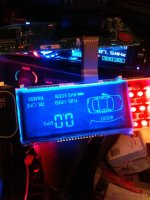
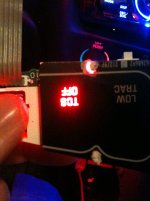
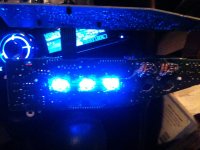
not put back together but you can see the improvement:IMG_0508.jpg

IMG_0509.jpg

IMG_0505.jpg

IMG_0521.jpg

IMG_0505.jpg
 

Attachments

  • IMG_0525.jpg
    IMG_0525.jpg
    193.9 KB · Views: 360
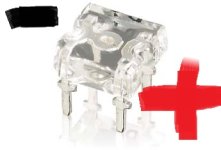
theres not much way to tell on these what the polarity is so i checked with my batt charger before i started soldering and this is what i came up with... dunno if you can make it out real well but the side with the most metal is neg like this:

pRS1C-4724929w345.jpg

i took the neg side and folded it down to solder to board and left the posotive side up to atach resistor to


picked up a few pieces for this today, hoping to do it friday. i have a few of the two pin LED's that i'm planning on sanding the tips down and, if i can find paint, dipping it in black paint. pics to come
 
Back
Top